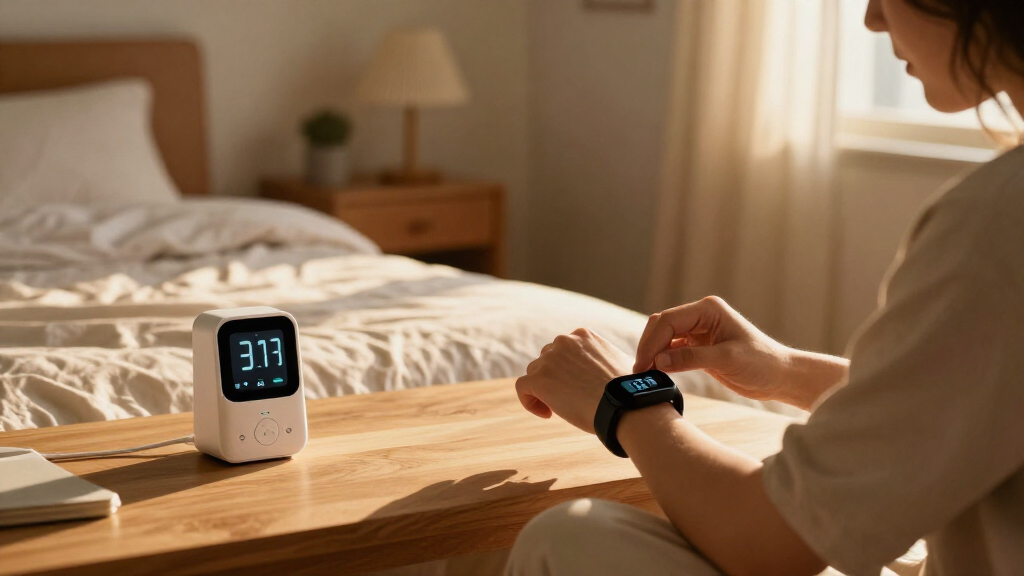

Choosing a smart home health monitor is mainly a choice between tracking a focused set of trends well and collecting a wider range of measurements from one device. Connected smart scales (Option A) are built around weight, with some models estimating body composition; multi-sensor health hubs (Option B) may add measurements such as blood pressure, heart rate, oxygen saturation or temperature. The exact readings vary by product, and estimates are not a substitute for clinical assessment.

Get health and wellness essentials delivered free with Prime
- Fast, free delivery on millions of items
- Prime Video, Amazon Music and more included
- Member-only deals all year

iHealth Track Pro Upper Arm Blood Pressure Monitor
- ✔ Measurement location: Upper arm
- ✔ Operation: One-touch automatic
- ✔ Display: Wide-angle LED with red, yellow, and green indicators
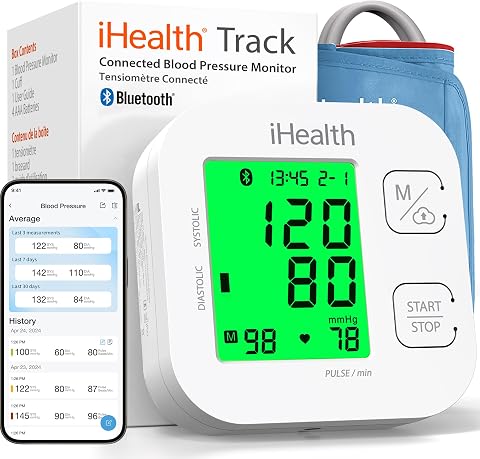
iHealth Track Smart Upper Arm Blood Pressure Monitor with Wide-Range Cuff
- ✔ Measurement location: Upper arm
- ✔ Controls: Two-button operation
- ✔ Display: Large, multicolor backlit display

iHealth Neo Wireless Upper Arm Blood Pressure Monitor with App
- ✔ Measurement type: Upper-arm blood pressure
- ✔ Operation: One button
- ✔ Measurement time: 30–60 seconds
A scale is usually the more practical fit if you want a simple routine and weight trends shared with a phone app. A hub makes more sense if several household members want different readings in one place and will use them regularly. The central tradeoff is breadth against simplicity and cost: more sensors can add useful context, but only when their measurements are reliable for your needs and you understand how to interpret them.
At a Glance
| Criteria | Connected smart scales | Multi-sensor health hubs | Winner |
|---|---|---|---|
| Measurement focus | Weight; some models estimate body composition | Several measurements, depending on the hub | Depends |
| Ease of routine | Step on the scale and sync readings | Can require positioning, calibration or separate readings | A |
| Trend tracking | Strong fit for regular weight history; estimates can add context | Broader picture if readings are collected consistently | Depends |
| Household sharing | Often supports multiple profiles, though setup varies | Can suit varied needs, but shared-device setup matters | Depends |
| Measurement confidence | Weight is directly measured; body composition is generally estimated | Accuracy and intended use differ by measurement and product | A |
| Privacy and data handling | App and cloud policies vary by brand | More health data may be collected; check storage and sharing controls | Depends |
| Cost and value | Usually the lower-cost, simpler entry point | Higher cost can pay off when multiple readings are used | A |
iHealth Track Pro Upper Arm Blood Pressure Monitor
The Track Pro earns our top spot by helping users catch common measurement setup issues as they happen. Its one-touch automatic operation keeps the basic routine simple, while sensors detect movement, cuff-wrap problems, and irregular heartbeats. That combination gives it a practical advantage over the original Track, whose supplied feature set highlights its display and heart rhythm alerts but does not list movement or cuff-placement detection. For a household building a repeatable home routine, those extra cues can make the Pro easier to learn and operate consistently.The wide-angle LED screen with red, yellow, and green indicators is designed to make readings easy to see and interpret at a glance. It stores up to 120 readings on the device, compared with 99 for the original Track, and syncs with the MyVitals app for continued tracking and sharing. As with both Track models, however, app syncing requires a compatible phone and the iHealth app. Users who prefer keeping health information off a smartphone may want to rely on its device storage and confirm whether that capacity suits their routine.Power flexibility is another distinction: the Pro works with three AA batteries or USB-C, so it can be used with batteries or powered by its included cable. The tradeoff is that the instructions deserve careful attention before the first measurement; easy operation does not eliminate the need to position the cuff correctly and follow the recommended process. Compared with the Neo, the Pro is less focused on lightweight portability and rechargeable power, but it offers more on-device reading capacity and measurement feedback. We see it as the most balanced option for regular home monitoring.
Pros:
- One-touch automatic operation
- Detects movement, cuff-wrap issues, and irregular heartbeats
- Stores up to 120 readings and syncs unlimited readings with the app
- Runs on AA batteries or USB-C power
Cons:
- The manual should be read carefully before first use
- App syncing requires a compatible phone and MyVitals
Best for: Households that want a simple upper-arm routine with on-screen guidance for movement and cuff placement.
Not ideal for: People who want a rechargeable, lightweight monitor or who do not want to use the MyVitals app for longer-term tracking.
Bottom line: For most home routines, Track Pro offers the most useful mix of measurement guidance, device storage, and flexible power.
“For most home routines, Track Pro offers the most useful mix of measurement guidance, device storage, and flexible power.”
iHealth Track Smart Upper Arm Blood Pressure Monitor with Wide-Range Cuff
The original Track puts its emphasis on making a reading easy to see. Its large, multicolor backlit display and two-button interface provide a simple way to check results on the monitor itself, without opening an app each time. This makes it a natural choice for someone who values a readable screen and straightforward controls more than extra measurement guidance. The Track Pro adds movement and cuff-wrap detection and raises device storage from 99 to 120 readings, so buyers who want more help with setup should consider the Pro instead.At home, the Track can store up to 99 readings on the device and connect over Bluetooth to iOS or Android for more tracking in an app. Its automatic alert for detected heart rhythm disturbances adds another kind of feedback, though it does not replace medical assessment. The wide-range cuff fits upper arms from 8.7 to 16.5 inches, matching the fit range listed for Track Pro. That shared fit makes the choice between the two less about sizing and more about whether the Pro’s added sensors and slightly larger memory matter to your household.The main compromise is the division between local use and connected tracking: the monitor works as a reading device, but app-based history requires a compatible smartphone and Bluetooth. Its 99-reading limit is also lower than the Pro’s stated capacity, so frequent users may need to sync data or maintain records elsewhere. Compared with the Neo, the Track is more display-oriented and uses replaceable AAA batteries, while the Neo offers rechargeable power and export formats. This model makes most sense for buyers who want a clear home display and a familiar upper-arm format without prioritizing portability.
Pros:
- Large color-coded backlit display
- Two-button operation
- Stores up to 99 readings and supports app tracking
- Wide-range cuff and automatic heart rhythm disturbance alerts
Cons:
- App tracking requires a compatible smartphone and Bluetooth
- On-device storage is lower than Track Pro’s stated 120 readings
Best for: People who want a large, color-coded screen and a simple two-button blood pressure routine at home.
Not ideal for: Users who want measurement error detection, more on-device history, or a rechargeable design.
Bottom line: Choose the original Track when screen readability and simple controls matter more than the Pro’s extra measurement cues.
“Choose the original Track when screen readability and simple controls matter more than the Pro’s extra measurement cues.”
iHealth Neo Wireless Upper Arm Blood Pressure Monitor with App
The Neo stands apart from the Track models by focusing on portability and data handling. Its thin, lightweight design and rechargeable 950 mAh battery make it a sensible option for someone who wants to move a monitor between rooms or pack it for travel without planning around disposable batteries. The battery is specified for up to 130 measurements per charge, and the one-button operation keeps the interaction pared back. Compared with Track Pro, though, the Neo does not list movement or cuff-wrap detection, so users who want help checking their setup may prefer the Pro’s more instructive feature set.Readings take about 30 to 60 seconds, and Bluetooth connects the device to the MyVitals app. The app can store, export, and share measurements in CSV, XLS, and PDF formats. Those formats give the Neo an advantage for people who need to organize a history or send records in a form that can be opened in common spreadsheet and document tools. The Track models also support app-based tracking, but their supplied specifications emphasize on-device reading limits and do not list the Neo’s export formats.The Neo is described as clinically validated, and its gentle inflation is intended to make the measurement process more comfortable. Buyers should still follow the instructions and use the cuff properly; the supplied details do not provide a cuff circumference range, so we would verify fit before choosing it. App syncing depends on a compatible device, and the monitor’s connected features rely on MyVitals. That makes it less appealing for someone seeking a self-contained record on the device. We rank it third overall because its strengths are specific and useful, but Track Pro offers broader built-in setup feedback for a general home routine.
Pros:
- Thin, lightweight design for portability
- Rechargeable battery supports up to 130 measurements per charge
- MyVitals app supports storage, sharing, and CSV, XLS, and PDF exports
- One-button operation and gentle inflation
Cons:
- Syncing requires a compatible device and the MyVitals app
- The supplied specifications do not state a cuff circumference range
- Movement and cuff-wrap detection are not listed
Best for: People who value a lightweight, rechargeable monitor and want to export or share readings through an app.
Not ideal for: Buyers who want extensive on-device storage, measurement setup sensors, or a clearly specified cuff fit range.
Bottom line: The Neo is the right fit for portable, rechargeable monitoring and exportable records, provided its cuff fit and app dependence suit your needs.
“The Neo is the right fit for portable, rechargeable monitoring and exportable records, provided its cuff fit and app dependence suit your needs.”
As an Amazon Associate we earn from qualifying purchases.
Key Differences
The biggest difference is what the device asks you to do. A connected scale fits into an existing routine: take a reading, then review a weight trend over time. Some scales display body fat or other composition figures, but these are estimates and can vary with hydration and measurement conditions. Treat them as rough trend indicators rather than precise measures of health.
A multi-sensor hub may provide a broader set of readings, which is useful when those measurements answer a real question or support a routine recommended by a clinician. That breadth also brings more steps, more data to interpret and potentially a higher purchase price. A device with many sensors is not automatically more useful: check that its readings suit your intended use, that the app presents them clearly, and that you can export or share results if needed.
For most households seeking a general wellness habit, the scale is the better value because it is simpler and easier to use consistently. The hub earns its higher cost when its specific measurements will be taken and acted on. Neither category should be used to diagnose a condition or replace advice from a qualified health professional.
Detailed Comparison
Measurement focus (moderate difference)
Option A concentrates on weight and may add estimated body composition. Option B covers more types of readings, though the included sensors differ by model. Winner: Depends; the gap is moderate. Choose the scale for weight trends; choose a hub only when its additional readings match a specific need.
Ease of routine (Connected smart scales wins — moderate)
Option A generally asks for a quick step-on reading. Option B may involve sitting still, fitting a cuff, placing a finger sensor or following other instructions. Option A wins by a moderate gap. A low-friction routine is more likely to be repeated, while a hub’s extra steps are worthwhile only if its measurements matter to you.
Trend tracking (moderate difference)
Both types can record readings in an app. Option A is naturally suited to tracking weight over time; Option B can show several trends but may split attention across them. Winner: Depends; the gap is moderate. The better choice is the device that measures the trend you will actually review, with consistent timing and conditions.
Household sharing (minor difference)
Both may support multiple users, but profile detection and sharing controls depend on the product. Option A is straightforward when household members each have a profile. Option B can accommodate different monitoring needs, yet may store more sensitive data in a shared app. Winner: Depends; the gap is minor. Check profile separation and guest handling before buying for a household.
Measurement confidence (Connected smart scales wins — minor)
A scale directly measures weight, while composition figures from consumer scales are estimates. A hub’s confidence depends on the sensor and measurement: different readings have different limitations and intended uses. Option A wins narrowly for its core weight reading; the overall gap is minor. For any health decision, follow the device instructions and confirm concerns with a clinician.
Privacy and data handling (moderate difference)
Either option may sync personal information to a phone app or cloud service. A hub can collect a wider range of health data, making account security, retention and sharing terms especially relevant. Winner: Depends; the gap is moderate. Compare the manufacturer’s data controls and avoid assuming that local-looking hardware keeps readings private.
Cost and value (Connected smart scales wins — moderate)
Option A is usually the less expensive way to build a tracking habit. Option B costs more, and its extra sensors improve value only when you use their readings. Option A wins for most general wellness buyers by a moderate gap. Pay more for a hub when its specific functions replace separate devices or support a routine you will maintain.
Connected smart scales: Pros and Cons
Pros:
- Simple routine built around a familiar measurement
- Often lower purchase cost
- Weight history is easy to follow in an app
- Some models add composition estimates
Cons:
- Limited measurement range
- Body composition figures are estimates, not definitive measurements
- App, profile and privacy features vary by brand
Multi-sensor health hubs: Pros and Cons
Pros:
- Can combine several health readings in one device
- May suit households with varied monitoring routines
- More context is available when readings are relevant and consistent
Cons:
- Typically costs more than a basic connected scale
- Additional setup and interpretation can reduce regular use
- Sensor quality, intended use and data policies vary across models
Who Should Choose What
Choose Connected smart scales if:
- You mainly want to track weight over time.
- You prefer a quick measurement that fits into a daily routine.
- You want a lower-cost starting point for connected wellness tracking.
Choose Multi-sensor health hubs if:
- You have a clear reason to monitor particular readings beyond weight.
- Several household members will use the hub’s different functions.
- You have checked that its sensors and app meet your intended use.
Skip both if: Skip both if you need a medical diagnosis, clinical-grade monitoring or treatment decisions; ask a health professional which validated device is appropriate.
Value for Money
For most people, a connected scale offers better value: it costs less, focuses on a clear trend and is easier to use regularly. Paying more for a multi-sensor hub is worthwhile when you will use its specific readings, its app makes them understandable, and it replaces tools you would otherwise buy separately. If the extra measurements are merely interesting, the higher price is hard to justify. Compare the purchase price alongside any app subscription, replacement parts and data export options.
Final Verdict
Choose a connected smart scale if your main goal is a manageable weight trend and a simple app record. For a typical wellness buyer, it is the clearer value. Choose a multi-sensor health hub if you have a concrete use for its additional readings and will follow a consistent routine. The deciding factor is not the number of sensors; it is whether the measurements you need are suitable, understandable and useful enough to justify the added cost. If you need clinical monitoring, seek professional guidance before relying on either category.
Frequently Asked Questions
Are smart scale body fat readings accurate?
They are estimates and can shift with hydration and other conditions. Use them cautiously as a rough trend, and do not treat one reading as a clinical measurement.
Is a multi-sensor health hub better than a smart scale?
It is better when you need and will use the additional readings. For weight tracking alone, a connected scale is simpler and usually better value.
Can these devices diagnose a health problem?
No. Consumer wellness monitors can help record readings, but they do not replace clinical assessment. Discuss concerning results with a qualified health professional.
What should I check before buying a shared household monitor?
Check support for separate user profiles, how readings are assigned, app access controls, data storage and whether results can be exported or shared with a clinician.