
Choose and set up a home wellness device for a specific goal, such as tracking activity, checking temperature, or improving comfort. This guide is for beginners comparing consumer devices and learning how to use one at home. Allow 30-60 minutes to check your needs, review the instructions, and complete the first setup; routine use depends on the device.

Get health and wellness essentials delivered free with Prime
- Fast, free delivery on millions of items
- Prime Video, Amazon Music and more included
- Member-only deals all year
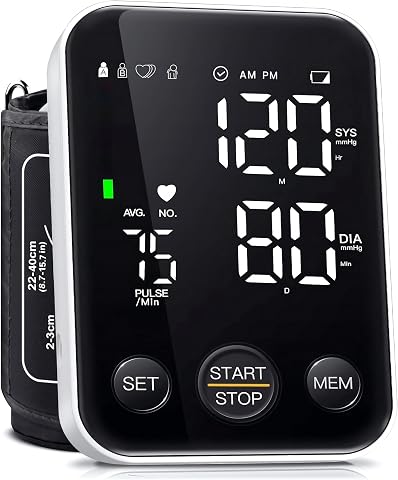
Oklar Upper Arm Blood Pressure Monitor
- ✔ Measurement method: Upper arm
- ✔ Operation: One-button
- ✔ Display: Backlit LED

RESTCLOUD Neck and Shoulder Relaxer, Cervical Traction Device (Dark Blue)
- ✔ Material: Polyurethane foam
- ✔ Color: Dark blue
- ✔ Use: Cervical traction and neck stretching

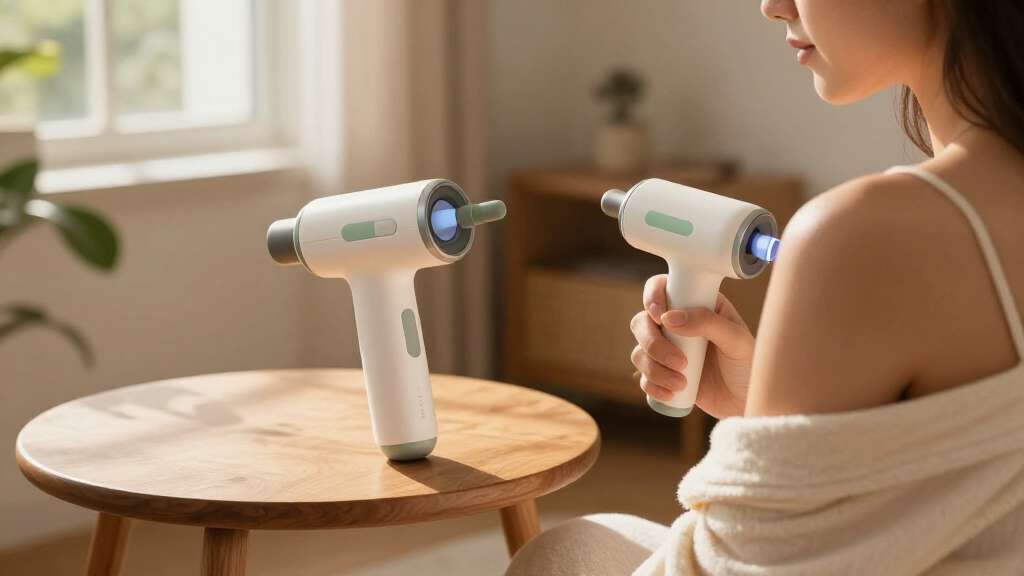
Lifepro LumiCure Handheld Red Light Therapy Wand
- ✔ Light wavelengths: 3
- ✔ Light types: Red and near-infrared
- ✔ Format: Handheld
Difficulty: Beginner | Time: 30-60 minutes for selection and setup; daily use varies by device
What You’ll Need
Tools & Materials:
- The device and its manufacturer’s instructions
- A compatible phone or account if the device requires one
- Batteries or a charger, if required
- A clean, dry place to store and use the device
Knowledge:
- The wellness goal you want the device to support
- Basic ability to follow product instructions and use a phone if needed
Consumer wellness devices differ in what they measure and how they work. They may not be medical devices, and readings may not be suitable for diagnosing or treating a condition. If you have a health condition, use medical equipment, are pregnant, or are unsure whether a device is safe for you, ask a qualified health professional before use.
Oklar Upper Arm Blood Pressure Monitor
For a household that wants a straightforward way to record blood pressure readings, the Oklar Upper Arm Blood Pressure Monitor is the most clearly specified device in this lineup. Its one-button operation and large backlit screen reduce the number of steps between starting a measurement and reading the result. It stores up to 240 readings, split between two users, which can help keep household records organized over time. The stated measurement time is within one minute.Compared with RESTCLOUD’s limited-session stretching routine and Lifepro’s less-detailed light therapy information, Oklar has the most explicit everyday use case. It can run on three AA batteries or a Type-C cable, but it is not rechargeable; buyers should plan for batteries or access to cable power. Its cuff fits arms from 8.7 to 15.7 inches, so checking fit is essential. As with any home monitor, correct positioning and following the device instructions matter, and readings should be discussed with a healthcare professional when appropriate.
Pros:
- One-button operation keeps the measurement process simple.
- Large backlit LED display is designed for easy reading.
- Stores up to 240 readings for two users.
- Offers AA battery or Type-C cable power options.
Cons:
- It is not rechargeable, so batteries or cable power are required.
- The cuff range may not fit arms outside 8.7–15.7 inches.
- A home reading still depends on proper cuff placement and use.
Best for: People who want a simple upper-arm monitor with a readable display and saved readings for two household users.
Not ideal for: People whose upper arm is outside the stated 8.7–15.7-inch cuff range, or who specifically want a rechargeable device.
Bottom line: Choose Oklar when shared blood pressure tracking and simple operation matter more than rechargeable power.
“Choose Oklar when shared blood pressure tracking and simple operation matter more than rechargeable power.”
RESTCLOUD Neck and Shoulder Relaxer, Cervical Traction Device (Dark Blue)
The RESTCLOUD Neck and Shoulder Relaxer is the lineup’s most focused option: it is a shaped foam support intended to provide a gentle neck stretch while supporting the head and cervical spine. Its lightweight polyurethane foam construction is easy to carry and can be used on a hard, flat surface, including a floor or yoga mat. That simplicity makes it a more direct fit for a brief stretching routine than the Oklar monitor, which is designed for measurement rather than physical comfort.Its limits are central to the decision. The recommended use is 10 minutes at a time, with no more than 30 minutes daily, and it is not intended for overnight use. Initial discomfort is possible, and improper or excessive use may aggravate existing conditions or cause injury. Compared with Lifepro’s portable wand, RESTCLOUD has a more clearly described use and session window, but its suitability is personal: anyone with neck concerns should consider professional guidance before using a traction device. This is a short-session stretching aid, not an all-night pillow or a treatment plan.
Pros:
- Ergonomic curve is designed to support the cervical spine.
- Lightweight foam design is easy to move and store.
- Can be used on a floor, flat outdoor surface, or yoga mat.
- Recommended session limits give buyers a defined use window.
Cons:
- Not intended for overnight use.
- Initial use may cause discomfort.
- Improper or excessive use may aggravate existing conditions or cause injury.
Best for: People seeking a lightweight foam device for brief, carefully limited neck-stretching sessions on a firm, flat surface.
Not ideal for: People seeking overnight neck support, those who cannot use the device comfortably, or anyone whose condition may be aggravated by traction without clinical guidance.
Bottom line: Pick RESTCLOUD for short, supervised-by-your-own-comfort stretching sessions, provided you can follow its time limits.
“Pick RESTCLOUD for short, supervised-by-your-own-comfort stretching sessions, provided you can follow its time limits.”
Lifepro LumiCure Handheld Red Light Therapy Wand
The Lifepro LumiCure Handheld Red Light Therapy Wand is for buyers who want a portable device for targeted red and near-infrared light sessions. Its handheld form makes it easier to direct toward a chosen area than either the fixed foam shape of RESTCLOUD or the measurement-focused Oklar monitor. The product is described as using three light wavelengths, and it includes a wrist strap and zippered case for carrying and storage.Portability is its strongest distinction, but the available specifications leave practical questions open. Exact wavelength values and a treatment duration are not provided, so buyers have less information for comparing protocols or deciding how a session should fit into a routine. Dimensions and weight are also unspecified. That makes LumiCure harder to assess in advance than RESTCLOUD, whose session limits are stated, or Oklar, which lists its cuff range and reading time. We would choose it for the handheld format and light-based approach, while checking the manufacturer’s instructions for usage guidance before starting.
Pros:
- Portable handheld format supports targeted use.
- Combines red and near-infrared light types.
- Uses three wavelengths, according to the product description.
- Includes a wrist strap and zippered carrying case.
Cons:
- Exact technical wavelength details are not provided here.
- No treatment duration is specified in the supplied details.
- Dimensions and weight are not stated.
Best for: People who want a handheld red and near-infrared light device with a case and wrist strap for storage and transport.
Not ideal for: Buyers who need stated dimensions, exact wavelength values, or clear treatment-duration details before choosing a device.
Bottom line: Choose LumiCure when portability and a handheld light format lead your priorities, and verify session guidance before use.
“Choose LumiCure when portability and a handheld light format lead your priorities, and verify session guidance before use.”
As an Amazon Associate we earn from qualifying purchases.
Before You Start
Decide what you want the device to help you do before shopping or opening the package. Check the product label for intended use, age limits, restrictions, cleaning instructions, and whether it needs an app, subscription, or internet connection. Do not use a device that is damaged, recalled, or missing key instructions. Keep your usual care plan in place unless a health professional advises you to change it.
Step-by-Step Instructions
Step 1: Define your goal
Write down one practical goal, such as recording daily steps, checking room humidity, or measuring body temperature. Decide how often you expect to use the device and what you will do with the information. A focused goal makes it easier to choose a suitable product and avoid paying for features you will not use.
Tip:If you want to track a symptom or health measure, ask a clinician which information is useful and how to interpret it.
Check: You can describe what the device should do and how you plan to use its results.
Step 2: Check the device’s intended use
Read the packaging and product information to confirm that the device supports your goal. Check who it is designed for, what it measures, and any stated limits. Look for a clear explanation of accuracy, compatible body locations or conditions, and whether the manufacturer identifies it as a wellness product or medical device.
Tip:A wellness reading may show a pattern, but it may not be accurate enough to guide a diagnosis or medication decision.
Check: The listed purpose and limits match your intended use.
Step 3: Review safety and privacy details
Read safety warnings, contraindications, and cleaning directions before purchase or first use. For connected devices, check what personal data the app collects, where it is stored, and whether account creation or a subscription is required. Do not enter sensitive health details unless you are comfortable with the provider’s privacy terms.
Tip:Skip devices with unclear safety instructions or unclear costs for features you need.
Check: You know the device’s main restrictions, data requirements, and any ongoing costs.
Step 4: Prepare the device
Unpack the device and compare its parts with the instructions. Check for cracks, loose components, damaged cables, or missing accessories. Charge it or install the specified batteries, then clean any contact surfaces as directed. Place it on a stable, dry surface away from heat, water, and children unless the instructions say otherwise.
Tip:Use only the charger, batteries, and accessories approved by the manufacturer.
Check: The device is intact, powered, and ready for setup.
Step 5: Complete setup
Follow the manufacturer’s sequence to set the date, units, user profile, or app connection. Grant only the phone permissions the device needs to function. If it pairs by Bluetooth, keep the phone nearby and use the app’s pairing instructions instead of repeatedly pressing device buttons.
Tip:Use a strong, unique password for a connected account and enable available account security options.
Check: The display or app shows the correct units and recognizes the device without an error.
Step 6: Learn the correct use technique
Read the operating instructions from start to finish, then follow the stated position, timing, and preparation for each use. For body-contact devices, place them only where specified and keep skin clean and dry if instructed. For environmental devices, position them as directed and away from direct sunlight, vents, or moisture that could affect readings.
Tip:Do not improvise a use method based on another brand or device type.
Check: You can repeat the manufacturer’s setup and measurement steps without guessing.
Step 7: Take a baseline reading
Use the device once under the recommended conditions and note the result, time, and any relevant context. Follow any required rest period or warm-up interval. Repeat only if the instructions recommend it; repeated checks can create confusion when normal readings vary.
Tip:Record results in the app or a private log only if tracking them will help your goal.
Check: The device completes a reading or session and displays a result in the expected format.
Step 8: Interpret results cautiously
Compare results only with reference ranges or guidance supplied for that exact device and use. Look for trends over time when appropriate, rather than reacting to one isolated reading. Stop using the device and contact a health professional if it causes pain, irritation, dizziness, or another concerning effect.
Tip:Seek medical advice for symptoms or concerning readings; do not rely on a consumer wellness device in an emergency.
Check: You understand what the result can tell you and what it cannot establish.
Step 9: Clean and store the device
After use, clean the device only with the products and method listed by the manufacturer. Dry it fully if required, then store it in its case or another clean, dry place. Keep accessories together and follow battery or charging guidance for storage.
Tip:Do not immerse an electronic device or use household disinfectants unless the instructions permit them.
Check: The device is clean, undamaged, and stored where it will be ready for the next use.
Common Mistakes to Avoid
- Buying a device based on features or ratings without checking whether it serves the intended goal. — Name the goal first, then confirm the product’s stated use, limits, and compatibility.
- Treating a consumer wellness reading as a diagnosis or changing care based on one result. — Use readings as limited information and discuss health concerns with a qualified professional.
- Using the device in a position or environment that differs from its instructions. — Follow the specified placement, timing, and conditions each time.
- Cleaning the device with an unapproved liquid or storing it while wet. — Use the manufacturer’s cleaning method and dry or store it as directed.
Troubleshooting
Problem: The device will not power on.
Solution: Check the battery orientation or charge level, inspect the cable and outlet, and follow the reset instructions. Stop if the device or charger appears damaged.
Problem: The app cannot find or pair with the device.
Solution: Confirm Bluetooth is enabled, keep the phone nearby, check app compatibility, and restart pairing using the manufacturer’s sequence. Install app updates if available.
Problem: Readings vary more than expected.
Solution: Repeat the measurement under the same conditions and placement described in the instructions. Check batteries, fit, and environmental factors; contact the manufacturer if variation continues.
Problem: The device causes discomfort or skin irritation.
Solution: Stop using it, remove it safely, and follow the cleaning and care guidance. Seek medical advice if symptoms persist or worsen, and contact the manufacturer about the product.
What Success Looks Like
You have a device suited to a specific goal, have completed setup according to its instructions, and can use, clean, and store it correctly. Its screen or app presents expected results without error. You know the product’s limitations and when to ask a health professional for guidance.
Next Steps
Use the device at the frequency recommended by its instructions and review any tracked information at a sensible interval. Keep the instructions and support contact details accessible, install app or firmware updates from the official provider, and replace batteries or accessories as directed. Stop using the device if it becomes damaged or causes an adverse effect. Ask a qualified health professional to interpret health concerns or changes in symptoms.
Frequently Asked Questions
Can a home wellness device diagnose a health condition?
Many consumer wellness devices are not intended to diagnose conditions. Check the product’s stated purpose and discuss symptoms or concerning results with a qualified health professional.
Should I trust a single unusual reading?
First check that you followed the instructions and that the device is functioning correctly. Repeat only as directed. If the reading is concerning or you feel unwell, contact a health professional rather than relying on repeated home checks.
Do I need an app to use my device?
Some devices work independently; others require an app for setup, tracking, or key functions. Check compatibility, account requirements, subscriptions, and privacy terms before relying on app features.
How often should I clean the device?
Follow the manufacturer’s cleaning schedule and instructions, especially for devices shared between people or placed against skin. Do not assume that a product is waterproof or safe for a particular cleaner.
When should I stop using a wellness device?
Stop if it is damaged, behaves unpredictably, or causes pain, irritation, dizziness, or other concerning effects. Get medical advice for persistent symptoms and contact the manufacturer about device faults.
Halloween Picks
halloween
As an affiliate, we earn on qualifying purchases.