
Split ergonomic keyboards are designed to reduce strain by allowing a more natural hand and arm position, making them ideal for long typing sessions or those with wrist discomfort. The Logitech Ergo K860 stands out as the best overall due to its solid build, adjustable tenting, and integrated wrist rest. For budget-conscious buyers, the Perixx PERIBOARD-512B offers a reliable split layout at an accessible price, while the Kinesis Freestyle2 provides excellent flexibility for different workspace setups. However, choosing the right split keyboard involves tradeoffs between price, adjustability, portability, and typing feel. Continue reading for a detailed breakdown of each option and what to consider before buying.

Get health and wellness essentials delivered free with Prime
- Fast, free delivery on millions of items
- Prime Video, Amazon Music and more included
- Member-only deals all year
Key Takeaways
- Top picks balance ergonomic design with build quality, with Logitech and Kinesis leading in adjustability and comfort.
- Budget options like Perixx deliver good basic split layouts but may lack advanced features like tenting or wireless connectivity.
- Wireless models provide more freedom of movement but often come with higher costs and potential latency issues.
- Adjustability in tenting and split angles is crucial for customizing comfort, especially for prolonged use.
- Cushioned wrist rests and palm supports enhance comfort but can add to the overall size and weight of the keyboard.
| Perixx PERIBOARD-512B Wired Ergonomic Keyboard – Split Layout with Wrist Rest |  | Best Budget Split Ergonomic Keyboard | Connectivity: Wired USB | Layout: US English | Color options: Black, Beige, White | VIEW ON AMAZON | See Our Full Breakdown |
| Arteck Split Ergonomic Wireless Keyboard with Palm Rest |  | Best Wireless Ergonomic Keyboard with Long Battery Life | Connectivity: 2.4G USB Wireless | Battery Life: 6 months | Included: Nano USB receiver, USB-C charging cable, welcome guide | VIEW ON AMAZON | See Our Full Breakdown |
| Wired Ergonomic Split Keyboard with RGB Backlight & Numpad, Black |  | Best Full-Size Split Keyboard for Office and Gaming | Design: Split ergonomic with wrist rest and adjustable kickstands | Backlight: RGB with 10 dynamic modes and 7 solid colors | Connectivity: Wired USB-A with USB-C adapter | VIEW ON AMAZON | See Our Full Breakdown |
| Logitech Ergo K860 Wireless Ergonomic Split Keyboard with Wrist Rest |  | Best Premium Wireless Ergonomic Keyboard | Connectivity: USB receiver and Bluetooth | Wrist Rest: Pillowed with memory foam | Key Layout: Full-size | VIEW ON AMAZON | See Our Full Breakdown |
| Arteck Split Ergonomic Keyboard with Palm Rest, USB Wired Backlit Keyboard | 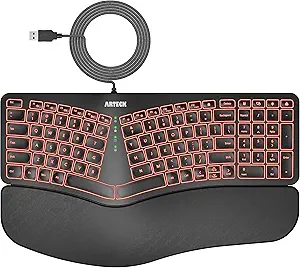 | Best Value for Backlit Ergonomic Keyboard | Design: Split ergonomic with palm rest | Connectivity: USB wired | Backlight: 7 colors with adjustable brightness | VIEW ON AMAZON | See Our Full Breakdown |
| SABLUTE Ergonomic Wireless Keyboard and Mouse, Rechargeable, Split, Win/Mac |  | Best Overall for Versatility and Comfort | Keyboard Layout: Full-size, split ergonomic | Connection: 2.4GHz wireless with USB-A receiver and USB-C adapter | Battery: Rechargeable, up to 250 hours keyboard standby | VIEW ON AMAZON | See Our Full Breakdown |
| TECKNET Wireless Ergonomic Keyboard Rechargeable, 2.4G+Bluetooth, Split Layout with Wrist Rest, Compatible with Windows, Desktop, Laptop |  | Best for Multi-Device Users and Custom Comfort | Connectivity: Bluetooth 5.0 and 2.4GHz wireless | Battery: 500mAh rechargeable lithium battery | Charging Port: USB-C | VIEW ON AMAZON | See Our Full Breakdown |
| Nulea Ergonomic Split Wireless Keyboard with Cushioned Wrist Rest |  | Best for Ambidextrous and Casual Ergonomics | Compatible Devices: Laptop, PC | Connectivity Technology: 2.4G, Bluetooth | Power Source: Battery Powered | VIEW ON AMAZON | See Our Full Breakdown |
| Kinesis Freestyle2 USB-A Ergonomic Keyboard with VIP3 Lifters for PC |  | Best for Highly Adjustable Ergonomics and Customization | Separation: Up to 9 inches | Tenting angles: 5, 10, 15 degrees | Layout: Standard Windows | VIEW ON AMAZON | See Our Full Breakdown |
| X9 Wired Ergonomic Keyboard with Cushioned Wrist Rest, 110 Keys, 5ft Cable for Laptop and PC |  | Best Budget Wired Ergonomic Keyboard | Design: Split ergonomic | Wrist Rest: Cushioned | Number of Keys: 110 | VIEW ON AMAZON | See Our Full Breakdown |
| split ergonomic keyboard | Connectivity |
|---|---|
| Perixx PERIBOARD-512B Wired Er | Wired USB |
| Arteck Split Ergonomic Wireles | 2.4G USB Wireless |
| Wired Ergonomic Split Keyboard | Wired USB-A with USB-C adapter |
| Logitech Ergo K860 Wireless Er | USB receiver and Bluetooth |
| Arteck Split Ergonomic Keyboar | USB wired |
| SABLUTE Ergonomic Wireless Key | — |
| TECKNET Wireless Ergonomic Key | Bluetooth 5.0 and 2.4GHz wireless |
| Nulea Ergonomic Split Wireless | — |
| Kinesis Freestyle2 USB-A Ergon | USB-A |
| X9 Wired Ergonomic Keyboard wi | — |
More Details on Our Top Picks
Perixx PERIBOARD-512B Wired Ergonomic Keyboard – Split Layout with Wrist Rest
The Perixx PERIBOARD-512B stands out for offering an ergonomic split design at an accessible price point, making it a strong choice for those new to ergonomic layouts. It emphasizes wrist support with a built-in rest and curved keycaps that improve comfort, but its membrane switches may feel less satisfying than mechanical alternatives like the Arteck Wired RGB. Compared to premium options, it sacrifices some tactile responsiveness but provides reliable, long-lasting performance suitable for everyday use. The wired connection ensures zero latency but limits mobility, and its simple design makes it ideal for budget-conscious users who prioritize function over flashy features. Overall, this model is best for users seeking an ergonomic start without breaking the bank, accepting some tradeoffs in typing feel.
Pros:- Affordable price point with ergonomic split layout
- Wrist rest supports natural positioning
- Durable membrane keys with up to 20 million keystrokes
Cons:- Membrane switches may lack tactile feedback preferred by some users
- Requires adjustment period for unfamiliar ergonomic layouts
Best for: Beginners or budget-conscious users seeking ergonomic benefits without premium features
Not ideal for: Heavy typists or gamers who prefer mechanical switches and wireless convenience
- Connectivity:Wired USB
- Layout:US English
- Color options:Black, Beige, White
- Key travel:4.2 mm
- Switch type:Membrane
- Durability:Up to 20 million keystrokes
Our verdict“This keyboard is a solid choice for new users prioritizing comfort and affordability over switch feel and wireless features.”
Arteck Split Ergonomic Wireless Keyboard with Palm Rest
The Arteck Wireless Split Keyboard offers the convenience of wireless connectivity along with a cushioned palm rest that enhances comfort during prolonged typing. Its split layout encourages better wrist positioning, similar to the Logitech Ergo K860, but without the ergonomic adjustability of tilt angles. The long-lasting 6-month battery life makes it ideal for users who dislike frequent charging, though it’s limited to Windows systems, unlike some more versatile options. The wireless setup is straightforward, but the need for a USB receiver may be a drawback for users seeking a fully wireless experience, especially if they prefer Bluetooth. This makes it well-suited for office environments where wired clutter is undesirable but wireless compatibility isn’t a priority.
Pros:- Wireless connectivity with long battery life of up to 6 months
- Cushioned palm rest improves comfort
- Easy setup with plug-and-play USB receiver
Cons:- Limited to Windows compatibility
- Requires USB receiver—less seamless than Bluetooth-only options
Best for: Office workers who want a wireless ergonomic keyboard with extended battery life
Not ideal for: Gamers or users with Mac systems who need broader OS compatibility and gaming features
- Connectivity:2.4G USB Wireless
- Battery Life:6 months
- Included:Nano USB receiver, USB-C charging cable, welcome guide
- Warranty:24 months
Our verdict“This keyboard is ideal for Windows users seeking wireless comfort and long battery life for daily work, not gaming or multi-OS setups.”
Wired Ergonomic Split Keyboard with RGB Backlight & Numpad, Black
This full-size wired ergonomic keyboard combines a split design with customizable RGB lighting, making it suitable for users who want both comfort and style. Its adjustable kickstands and integrated wrist rest support prolonged use, while the dedicated numpad and multimedia shortcuts boost productivity. Compared to more minimalist options like the Arteck USB Wired, this model offers a broader feature set that appeals to multitaskers and gamers alike. Nonetheless, its wired connection limits portability, and some OS-specific functionalities may vary, especially across Linux or Mac. It’s a compelling choice for those who need a versatile layout for work and gaming, accepting the tradeoff of less mobility and increased desk clutter.
Pros:- Split ergonomic design reduces wrist strain
- RGB backlighting with dynamic modes enhances aesthetics
- Full-size layout with dedicated shortcuts boosts productivity
Cons:- Wired connection limits portability and desk flexibility
- Some OS-specific features may not work equally across platforms
Best for: Office workers and gamers who want a full-featured, customizable ergonomic keyboard
Not ideal for: Users seeking a compact or wireless solution for portable setups
- Design:Split ergonomic with wrist rest and adjustable kickstands
- Backlight:RGB with 10 dynamic modes and 7 solid colors
- Connectivity:Wired USB-A with USB-C adapter
- Key Lifespan:10 million keystrokes
- Compatibility:Windows, macOS, Chrome OS, Linux
- Cable Length:5.6 ft
Our verdict“This full-size, RGB-enabled keyboard is perfect for users combining work and gaming who value extensive features at their desk.”
Logitech Ergo K860 Wireless Ergonomic Split Keyboard with Wrist Rest
The Logitech Ergo K860 excels in ergonomic design, with a curved split layout and a plush, memory foam wrist rest that enhances long-term comfort. Its adjustable tilt allows for personalized typing angles, making it a favorite among those who spend hours at their desks. Compared to wired options like the Perixx PERIBOARD-512B, it offers wireless freedom, but at a higher price point that reflects its premium build and added convenience. The need for software for full customization may be a minor hurdle, and its bulkier profile takes up more space. This keyboard is best for professionals seeking a high-end ergonomic solution that minimizes muscle strain while supporting a flexible workspace environment.
Pros:- Ergonomist-approved design reduces wrist and muscle strain
- Adjustable tilt for customized comfort
- Wireless connectivity via Bluetooth or USB receiver
Cons:- Higher price reflects premium features
- Bulkier design may require more desk space
Best for: Professionals and remote workers who want a premium, adjustable ergonomic keyboard with wireless convenience
Not ideal for: Budget-conscious users or those who prefer wired setups for simplicity
- Connectivity:USB receiver and Bluetooth
- Wrist Rest:Pillowed with memory foam
- Key Layout:Full-size
- Tilt Angles:0, -4, -7 degrees
- Material:71% post-consumer recycled plastic
- Certification:Ergonomist Approved
Our verdict“This premium wireless keyboard is ideal for users prioritizing ergonomic excellence and flexibility in a professional setting.”
Arteck Split Ergonomic Keyboard with Palm Rest, USB Wired Backlit Keyboard
The Arteck Split Keyboard provides a compelling balance between ergonomic design and aesthetic appeal, with its adjustable backlit keys and cushioned palm rest. Its split layout promotes natural wrist positioning, similar to the Perixx PERIBOARD-512B, but adds visual customization through colorful lighting. The wired connection ensures reliable performance, though it limits mobility compared to wireless options like the Arteck Wireless. Compact and straightforward, it suits users who need a comfortable, visually adjustable keyboard on a Windows system. The lack of wireless capability may be a downside for those seeking a clutter-free workspace, but its affordability and ease of use make it attractive for budget-conscious buyers who still want ergonomic benefits.
Pros:- Split ergonomic design reduces wrist strain
- 7-color backlit keys with adjustable brightness
- Easy plug-and-play setup for quick use
Cons:- Wired connection limits mobility
- No wireless option available
Best for: Windows users seeking an affordable, backlit ergonomic keyboard with straightforward plug-and-play setup
Not ideal for: Users who prioritize portability or wireless features, or those on Mac systems
- Design:Split ergonomic with palm rest
- Connectivity:USB wired
- Backlight:7 colors with adjustable brightness
- Wrist Rest:Cushioned
- Cable Length:6 feet
Our verdict“This keyboard is well-suited for budget-conscious users needing ergonomic comfort and backlit keys on Windows, accepting wired limitations.”
SABLUTE Ergonomic Wireless Keyboard and Mouse, Rechargeable, Split, Win/Mac
The SABLUTE Wireless Keyboard and Mouse combo stands out for its full-size split layout combined with a cushioned wrist rest, making it ideal for users who want a comprehensive ergonomic setup without sacrificing productivity. Compared with the TECKNET Wireless Ergonomic Keyboard, this model offers a more robust set of shortcut keys and a larger footprint, which can be a plus or a drawback depending on desk space. Its rechargeable battery with an impressive standby time minimizes interruptions, but the full-size design demands ample space, making it less suitable for small workstations. The adjustable tilt and wireless flexibility provide a tailored experience, making it particularly appealing for long, demanding work sessions.
Pros:- Full-size split design reduces wrist strain during long typing sessions
- Rechargeable with up to 250 hours of standby minimizes battery maintenance
- Adjustable tilt and cushioned wrist rest enhance ergonomic comfort
- Flexible connectivity via USB-A receiver and USB-C adapter
Cons:- Requires considerable desk space due to its full-size layout
- Can feel bulky for users with small workspaces
- Setup may seem complex for some users unfamiliar with wireless peripherals
Best for: Professionals with spacious desks seeking a full-featured ergonomic keyboard for extended use
Not ideal for: Users with limited desk space or those preferring a compact setup
- Keyboard Layout:Full-size, split ergonomic
- Connection:2.4GHz wireless with USB-A receiver and USB-C adapter
- Battery:Rechargeable, up to 250 hours keyboard standby
- Dimensions:19 × 10.45 × 1.88 inches
- DPI Levels:800/1200/1600/2400
- Compatibility:Windows and Mac
Our verdict“This pick suits users who prioritize a feature-rich, comfortable setup and have ample space to accommodate a full-size keyboard.”
TECKNET Wireless Ergonomic Keyboard Rechargeable, 2.4G+Bluetooth, Split Layout with Wrist Rest, Compatible with Windows, Desktop, Laptop
The TECKNET Wireless Ergonomic Keyboard offers a thoughtful split and curved design that targets long-term comfort, especially for multi-device users who benefit from its Bluetooth and 2.4GHz connectivity options. Unlike the Nulea Ergonomic Wireless Keyboard, which is more basic, TECKNET’s multi-device support makes it ideal for users juggling multiple computers or tablets. Its adjustable four-stage tilt allows for personalized ergonomics, but initial Bluetooth pairing can be a hurdle for some, and the absence of backlit keys limits usability in low-light conditions. Its compact profile makes it better suited for users who need a portable solution or have moderate desk space.
Pros:- Supports multi-device connectivity with easy switching between Bluetooth and 2.4GHz
- Ergonomic split and curved layout reduces strain during extended typing
- Supports four-stage tilt for customized ergonomic positioning
- Rechargeable with up to 200 hours of use, fast charging
Cons:- Initial Bluetooth pairing may require some setup effort
- Limited to Windows compatibility, restricting Mac users
- No backlit keys, limiting visibility in dim environments
Best for: Tech-savvy professionals who switch between multiple devices and need ergonomic comfort
Not ideal for: Users who prefer a wired setup or need backlit keys for low-light work
- Connectivity:Bluetooth 5.0 and 2.4GHz wireless
- Battery:500mAh rechargeable lithium battery
- Charging Port:USB-C
- Battery Life:Up to 200 hours
- Wrist Rest:High-density memory foam
- Adjustable Feet:4-stage tilt (0°, 1.2°, 3°, 6.2°)
Our verdict“This keyboard is ideal for multi-device users seeking ergonomic comfort combined with flexible connectivity options.”
Nulea Ergonomic Split Wireless Keyboard with Cushioned Wrist Rest
The Nulea Ergonomic Split Wireless Keyboard emphasizes simplicity and comfort, making it a solid choice for casual users or those who prefer ambidextrous layouts. Its dual-mode connectivity via Bluetooth and 2.4G provides versatility, but compared with the SABLUTE model, it offers fewer advanced features like shortcut keys or extensive adjustability. The soft palm rest and ergonomic split design help reduce muscle strain, but its limited device compatibility and basic build make it less suitable for power users or those needing a more robust setup. Still, its straightforward design appeals to users seeking a no-frills ergonomic keyboard.
Pros:- Ergonomic split design reduces muscle strain
- Rechargeable with 200-hour battery life
- Dual-mode Bluetooth and 2.4G connectivity for versatility
- Soft palm rest enhances wrist comfort
Cons:- Limited compatibility outside Windows and certain tablets
- Design may feel too basic for advanced users
- No backlit keys for low-light environments
Best for: Casual users or those new to ergonomic keyboards wanting comfort without complexity
Not ideal for: Power users or professionals requiring extensive customization or broad OS support
- Compatible Devices:Laptop, PC
- Connectivity Technology:2.4G, Bluetooth
- Power Source:Battery Powered
- Additional Features:Wrist Rest
- Number of Keys:104
- Color:A-Silver Black
Our verdict“This keyboard suits beginners or casual users who prioritize comfort and simplicity over advanced features.”
Kinesis Freestyle2 USB-A Ergonomic Keyboard with VIP3 Lifters for PC
The Kinesis Freestyle2 is designed for users who want maximum flexibility, offering an adjustable separation of up to 9 inches and multiple tenting angles. Compared to the X9 Wired Ergonomic Keyboard, it excels in customization, allowing users to tailor the setup to their exact ergonomic preferences. The low-force membrane keys reduce finger fatigue, which is a significant advantage for long typing sessions, but its modular design can feel bulky and requires dedicated space for separation and tenting. Compatibility is limited to Windows, restricting users on other OS platforms. This model is best suited for those who need personalized ergonomic adjustments and are comfortable with a more complex setup.
Pros:- Highly adjustable separation and tenting angles for personalized comfort
- Low-force keys reduce finger fatigue during extended use
- Includes accessories like palm supports for enhanced wrist support
- No software required, easy to set up
Cons:- Requires ample space for adjustments, which can be a drawback in small desks
- Bulky modular design may feel unwieldy
- Limited to Windows, restricting cross-platform flexibility
Best for: Power users or ergonomics enthusiasts seeking fully customizable split keyboards
Not ideal for: Users with limited space or those who prefer plug-and-play simplicity
- Separation:Up to 9 inches
- Tenting angles:5, 10, 15 degrees
- Layout:Standard Windows
- Switch type:Low-force membrane
- Connectivity:USB-A
- Included accessories:VIP3 tenting, palm supports
Our verdict“This pick is best for users who prioritize custom ergonomic adjustments and are willing to manage a more complex setup.”
X9 Wired Ergonomic Keyboard with Cushioned Wrist Rest, 110 Keys, 5ft Cable for Laptop and PC
The X9 Wired Ergonomic Keyboard offers a straightforward split design paired with a cushioned wrist rest, making it a practical choice for users who prefer wired reliability. Unlike the SABLUTE model, which provides wireless flexibility, X9’s wired connection ensures no latency or pairing issues, but at the expense of mobility. Its full-sized layout with a numeric keypad caters to productivity, though it lacks backlit keys, which can be limiting in dim environments. The simple plug-and-play setup makes it accessible for users who want no fuss, but users seeking wireless or advanced features should look elsewhere.
Pros:- Promotes natural hand positioning with split ergonomic design
- Includes a cushioned wrist rest for added comfort
- Full-sized layout with shortcuts and numeric keypad boosts productivity
- Plug-and-play setup requires no drivers
Cons:- Lacks backlit keys, limiting use in low-light conditions
- Wired connection reduces flexibility and mobility
- Design may feel basic compared to wireless options
Best for: Budget-conscious users who need a reliable, wired ergonomic keyboard for everyday work
Not ideal for: Those who require wireless convenience or backlit keys for low-light work
- Design:Split ergonomic
- Wrist Rest:Cushioned
- Number of Keys:110
- Cable Length:5ft
- Compatibility:PC, Chrome
- Backlit Keys:No
Our verdict“This keyboard is suitable for budget-minded users who prioritize a dependable wired connection over wireless features.”

How We Picked
These split ergonomic keyboards were selected based on a combination of ergonomic design, build quality, usability, and value. We prioritized models that offer adjustable split angles, tenting options, and wrist support, as these features directly impact comfort and reduce strain. Wireless connectivity, compatibility across devices, and ease of setup also influenced rankings, along with durability and user reviews. Products were ranked to favor those providing strong ergonomic benefits at different price points, ensuring options for various user needs, from beginners to advanced users seeking customization.Factors to Consider When Choosing Split Ergonomic Keyboards
Choosing the right split ergonomic keyboard involves evaluating several key factors. Not only should you consider comfort and adjustability, but also how the keyboard fits into your workspace, your preferred connectivity, and your budget. Making a well-informed decision can prevent discomfort and improve your typing experience over the long term. Here are some critical factors to keep in mind before purchasing.Adjustability and Tenting
Adjustability in split angle and tenting height allows you to customize the keyboard to your natural hand position, significantly reducing wrist strain. Models with multiple tenting options tend to be more versatile, accommodating different body types and preferences. Be cautious if a keyboard lacks sufficient adjustability, as a fixed design might cause discomfort after extended use, especially for taller or broader users.
Connectivity Options
Decide whether you prefer wired or wireless models. Wireless keyboards offer greater freedom of movement and a cleaner workspace but can introduce latency and require charging or batteries. Wired options tend to be more reliable and typically cost less, but they limit mobility. Consider your primary use case—if you need a portable solution, wireless is often more practical.
Build Quality and Materials
Durability is key, especially if you plan to use your keyboard daily. Look for sturdy materials like aluminum or high-quality plastics that withstand regular use. Pay attention to key switch quality and stabilizers, which influence typing feel. Cheaper models may feel flimsy or develop issues over time, so balancing cost with build quality is essential.
Size and Portability
Split keyboards can vary significantly in size, from compact designs to full-sized setups with numpads. Consider your workspace space and whether portability matters—some models are lightweight and easy to pack, while others are bulkier due to additional features like wrist rests. Ensure the size aligns with your typing style and workspace constraints to avoid discomfort or clutter.
Additional Features
Features like backlit keys, programmable macros, or integrated palm rests can enhance your typing experience but often come at a higher price. Think about which extras genuinely add value for your needs. For example, backlit keys are useful in low-light environments, and programmable keys benefit power users. Avoid paying for features you won’t use, as they can inflate the cost unnecessarily.
Frequently Asked Questions
Is a split ergonomic keyboard suitable for all-day typing?
Split ergonomic keyboards are designed to promote a natural hand position, which can reduce fatigue and discomfort during long typing sessions. However, they require an adjustment period—some users may need a few days or weeks to get accustomed to the layout. If you experience persistent discomfort, it’s worth experimenting with different angles or models with adjustable features. Proper setup and ergonomics are essential to maximize comfort and prevent strain.
Can I use a split ergonomic keyboard with my laptop?
Yes, many split ergonomic keyboards are compatible with laptops, especially those with standard USB or Bluetooth connectivity. Wireless models are particularly convenient for portable use, allowing you to connect without clutter. Just ensure your laptop supports the necessary connection type, and check compatibility with your operating system. For optimal comfort, consider a model with adjustable height or tenting to match your ergonomic preferences.
Are split ergonomic keyboards worth the investment?
For individuals experiencing wrist pain, discomfort, or repetitive strain injuries, split ergonomic keyboards can provide significant relief. They promote better posture and reduce strain, which can improve comfort and productivity over time. While they tend to cost more than traditional keyboards, many users find the investment worthwhile for the ergonomic benefits and potential health improvements. For casual users, a basic model might suffice, but those with specific needs should consider a higher-quality option.
What features should I prioritize if I want a beginner-friendly split keyboard?
Beginners should look for models with straightforward adjustability, such as simple tenting and split angles, and a comfortable wrist rest. Wireless connectivity can reduce desk clutter, and a lightweight design makes it easier to set up and relocate. Avoid overly complex models with numerous programmable keys or customizable layers, as these can be overwhelming initially. Focus on comfort, ease of use, and reliable connectivity to ease into ergonomic typing.
How important is build quality in a split ergonomic keyboard?
Build quality directly impacts the durability and long-term comfort of your keyboard. A well-constructed model made from quality materials will withstand daily use without developing issues like loose keys or wobbling parts. It also ensures that adjustable features like tenting and split angles function smoothly over time. Investing in a sturdy keyboard may cost more upfront but can save money and frustration in the long run by providing consistent performance and comfort.
Conclusion
For most users seeking a reliable, comfortable experience, the Logitech Ergo K860 offers a great balance of features, build quality, and value, making it the best overall choice. Budget-conscious buyers or those new to ergonomic setups may prefer the Perixx PERIBOARD-512B for its straightforward design. Professionals or enthusiasts who prioritize customization and adjustability should consider the Kinesis Freestyle2 for its flexibility. Ultimately, your choice depends on your workspace, budget, and comfort needs—select the model that best aligns with your ergonomic goals.
Halloween Picks
halloween
As an affiliate, we earn on qualifying purchases.