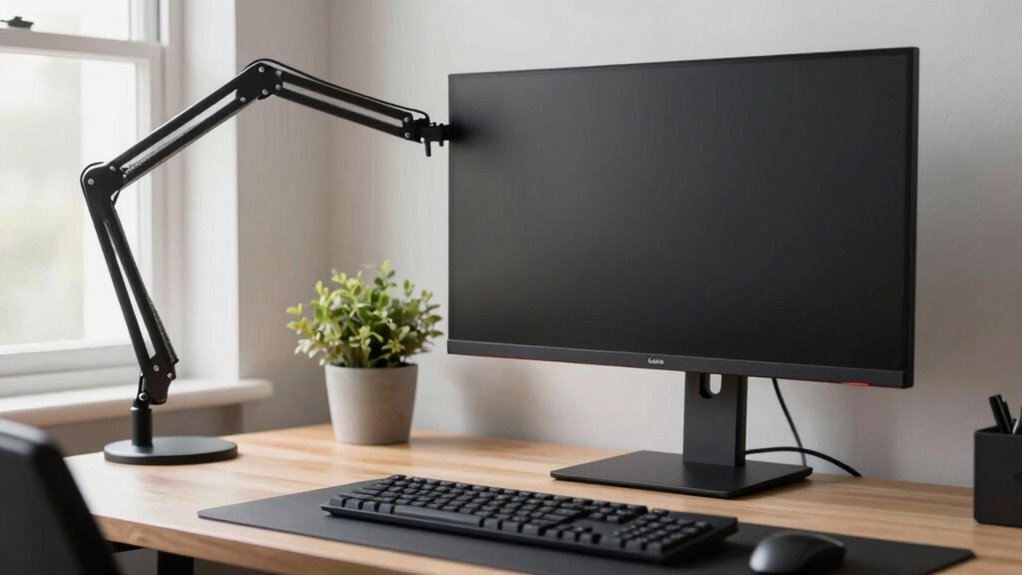
Choosing the right monitor arm for a productivity desk can dramatically improve your workspace comfort and efficiency. The best options offer smooth adjustability, sturdy build quality, and compatibility with various monitor sizes, but they vary in price and features. The WALI Adjustable Dual Monitor Arm stands out as the overall best due to its versatile adjustability and strong build, while the HUANUO FlowLift™ Pro makes a compelling choice for those needing full tilt and swivel. On the other hand, some budget-friendly models may sacrifice ease of use or durability for lower prices. Continue reading for a full breakdown of these options and what to consider before buying.

Get health and wellness essentials delivered free with Prime
- Fast, free delivery on millions of items
- Prime Video, Amazon Music and more included
- Member-only deals all year
Key Takeaways
- Top monitor arms combine full articulation with sturdy construction for long-term use.
- Compatibility with monitor sizes and VESA standards is essential for versatile setups.
- Adjustability features like tilt, swivel, and height are key to ergonomic comfort.
- Build quality often correlates with ease of installation and longevity, justifying higher costs.
- Tradeoffs often include price versus features; budget models may lack durability or full adjustability.
| WALI Adjustable Dual Monitor Arm for 13-32 inch Screens, 22 lbs per Arm |  | Best Overall for Ergonomic Versatility | Screen Size Compatibility: 13-32 inches | Max Load Capacity: 22 lbs per arm | VESA Pattern: 75x75mm and 100x100mm | VIEW ON AMAZON | See Our Full Breakdown |
| ErGear Dual Monitor Arm for 13–32″ Screens, Full Adjustable Mount with Tool-Free VESA |  | Best for Easy, Tool-Free Setup and Versatility | Supported Screen Size: 13–32 inches | Max Load: 19.8 lbs | VESA Compatibility: 75x75mm, 100x100mm | VIEW ON AMAZON | See Our Full Breakdown |
| HUANUO Dual Monitor Stand – Fully Adjustable Desk Mount with VESA Compatibility for 13-32 Inch Screens, White |  | Best for Precise Ergonomic Adjustments and Compatibility | Compatibility: 13-32 inch monitors | Max Load: 19.8 lbs | VESA Compatibility: 75x75mm, 100x100mm | VIEW ON AMAZON | See Our Full Breakdown |
| VIVO Dual Monitor Stand, Fully Adjustable Arms for 17 to 32 inch Screens, Mechanical Articulating Desk Mount, VESA 75×75, 100×100, Max 19.8 lbs, Black |  | Best Budget-Friendly Fully Adjustable Mount | Screen Size Compatibility: 17-32 inches | Weight Capacity: 19.8 lbs | VESA Compatibility: 75x75mm, 100x100mm | VIEW ON AMAZON | See Our Full Breakdown |
| 3IDEE Flexi Pro Monitor Arm for Desks (up to 40″ & 11 kg) – Curved, Heavy Duty, Spring-Assisted, Height-Adjustable & Fully Articulated – VESA 75/100, Space Grey |  | Best for Heavy and Large Monitors with Heavy-Duty Support | Max Monitor Size: 40 inches | Max Load: 11 kg | VESA Compatibility: 75x75mm, 100x100mm | VIEW ON AMAZON | See Our Full Breakdown |
| WALI Tall Monitor Arm Mount for 13-34 inch Screens, Supports up to 22 lbs per Arm |  | Best Overall for Flexible Ergonomics and Space Management | Compatibility: 13-34 inch screens | Max Load: 22 lbs per arm | Mounting Options: C-Clamp and Grommet-Base | VIEW ON AMAZON | See Our Full Breakdown |
| HUANUO FlowLift™ Pro Monitor Arm for 13–32″ Screens, MechaSpring Monitor Mount, Fully-Adjustable Monitor Stand with Tilt/Swivel/Rotation, Tool-Free VESA Mount, C-Clamp/Grommet Base, Max Load 19.8 lbs |  | Best for Long-lasting, Precise Support with Healthcare-Backed Ergonomics | Supports Monitors Up To: 32 inches | VESA Compatibility: 75x75mm, 100x100mm | Adjustment Range: ±90° rotation, -25° to 90° tilt, swivel, 230mm height travel | VIEW ON AMAZON | See Our Full Breakdown |
| HUNAUO Dual Monitor Stand for 13-40 inch Monitors with USB, Height Adjustable, VESA Mount, Clamp/Grommet Base |  | Best for Heavy, Large Dual Monitors with USB Convenience | Supported Screen Size: 13-40 inches | Weight Capacity: 26.4 lbs per arm | VESA Compatibility: 75×75mm or 100×100mm | VIEW ON AMAZON | See Our Full Breakdown |
| SmooVex™ Monitor Mount for Up to 32 Inches, Mechanical Spring, VESA 75/100mm, Model-A5 (Black) |  | Best Mechanical Spring Support for Precise, Stable Ergonomics | Supports Monitors Up To: 32 Inches | VESA Compatibility: 75x75mm, 100x100mm | Adjustment Range: ±90° rotation, -25° to 90° tilt, swivel, 230mm height travel | VIEW ON AMAZON | See Our Full Breakdown |
| Flexispot Dual Monitor Arm, 17-32 Inch Adjustable VESA Mount for Home Office and Gaming |  | Best for Flexible, Ergonomic Dual Monitors in Compact Spaces | Monitor Size Range: 17-32 inches | Max Load: 19.84 lbs | VESA Compatibility: 75x75mm, 100x100mm | VIEW ON AMAZON | See Our Full Breakdown |
| monitor arms for productivity desk | VESA Compatibility | Mounting Options | Max Load | Height Adjustment |
|---|---|---|---|---|
| WALI Adjustable Dual Monitor A | — | C-clamp or grommet base | — | Up to 17.3 inches |
| ErGear Dual Monitor Arm for 13 | 75x75mm, 100x100mm | — | 19.8 lbs | Up to 17.5 inches |
| HUANUO Dual Monitor Stand | 75x75mm, 100x100mm | — | 19.8 lbs | Supports pneumatic spring adjustment |
| VIVO Dual Monitor Stand | 75x75mm, 100x100mm | Heavy-duty C-clamp, bolt-through grommet | — | — |
| 3IDEE Flexi Pro Monitor Arm fo | 75x75mm, 100x100mm | — | 11 kg | Spring-assisted |
| WALI Tall Monitor Arm Mount fo | 75x75mm, 100x100mm | C-Clamp and Grommet-Base | 22 lbs per arm | Yes |
| HUANUO FlowLift™ Pro Monitor A | 75x75mm, 100x100mm | C-clamp, grommet | 19.8 lbs | — |
| HUNAUO Dual Monitor Stand for | 75×75mm or 100×100mm | Clamp and Grommet | — | — |
| SmooVex™ Monitor Mount for Up | 75x75mm, 100x100mm | C-clamp, grommet | Supports up to 32 inches | — |
| Flexispot Dual Monitor Arm | 75x75mm, 100x100mm | Clamp, grommet | 19.84 lbs | — |
More Details on Our Top Picks
WALI Adjustable Dual Monitor Arm for 13-32 inch Screens, 22 lbs per Arm
This dual monitor arm stands out for its full range of motion, making it ideal for users who want maximum ergonomic flexibility. Unlike the VIVO Dual Monitor Stand, which offers similar adjustability, the WALI provides a slightly taller height adjustment of up to 17.3 inches, helping users achieve eye-level positioning. Its simple clamp or grommet mounting options facilitate installation on most wooden desks, though it’s less suitable for desks with crossbeams or thicker surfaces. The built-in cable management helps keep clutter at bay, but the 22 lbs weight limit per arm might restrict heavier monitors, unlike the 3IDEE Flexi Pro, which supports larger screens up to 40 inches. Overall, this pick makes the most sense for those prioritizing a combination of full motion, easy installation, and workspace tidiness.
Pros:- Full motion adjustments for ergonomic positioning
- Easy to install with multiple mounting options
- Built-in cable management for a tidy workspace
- Supports dual monitors up to 32 inches
Cons:- Recommended only for wooden desks without crossbeams
- Maximum weight per arm is 22 lbs, limiting heavier monitors
Best for: Ergonomics-focused professionals with monitors up to 32 inches and moderate weight needs
Not ideal for: Users with heavier or larger monitors exceeding 22 lbs or desks with thick crossbeams
- Screen Size Compatibility:13-32 inches
- Max Load Capacity:22 lbs per arm
- VESA Pattern:75x75mm and 100x100mm
- Extension:19.3 inches
- Height Adjustment:Up to 17.3 inches
- Swivel:+90°/-90°
- Tilt:+70°/-45°
- Rotation:360°
- Mounting Options:C-clamp or grommet base
Our verdict“Best suited for users seeking a versatile, full-motion dual monitor arm with straightforward installation and cable management.”
ErGear Dual Monitor Arm for 13–32″ Screens, Full Adjustable Mount with Tool-Free VESA
Compared with the HUANUO Dual Monitor Stand, the ErGear model offers a more straightforward tool-free installation process, making it a strong choice for users who want quick setup without sacrificing adjustability. It supports a broad range of monitor sizes and weights up to 19.8 lbs, with a maximum extension of 18.1 inches and height adjustment up to 17.5 inches. Its tilt range of +80°/-50° and 360° rotation ensure precise ergonomic positioning. However, the weight limit of 19.8 lbs may exclude very heavy or large monitors, and some users report initial tight adjustment mechanisms. This arm strikes a balance between ease of use and flexible positioning, ideal for busy professionals who need a reliable, adaptable setup.
Pros:- Supports a wide range of monitor sizes and weights
- Tool-free, quick installation with versatile mounting options
- Flexible adjustments for ergonomic comfort
- Effective cable management keeps workspace tidy
Cons:- Maximum weight limit of 19.8 lbs may exclude larger monitors
- Adjustment mechanisms can be tight initially
Best for: Workspaces where quick installation and easy adjustments are priorities
Not ideal for: Heavy monitors over 20 lbs or users who prefer manual adjustment mechanisms
- Supported Screen Size:13–32 inches
- Max Load:19.8 lbs
- VESA Compatibility:75x75mm, 100x100mm
- Height Adjustment:Up to 17.5 inches
- Extension:Up to 18.1 inches
- Tilt:+80°/-50°
- Swivel:±90°
- Rotation:360°
- Clamp Range:Desk thickness 0.39″ to 2.56″ (clamp), 0.39″ to 2.95″ (grommet)
Our verdict“A solid choice for users needing quick setup, flexible positioning, and support for various monitor sizes without complex installation.”
HUANUO Dual Monitor Stand – Fully Adjustable Desk Mount with VESA Compatibility for 13-32 Inch Screens, White
The HUANUO dual monitor stand excels in providing smooth, full adjustability with its pneumatic spring arms, making it ideal for users who frequently reposition their monitors. Unlike the VIVO Dual Monitor Stand, which offers manual adjustments, the HUANUO’s pneumatic system allows for easier, more precise movements. It supports monitors from 13 to 32 inches, with a weight capacity up to 19.8 lbs, making it suitable for many mid-sized setups. While the assembly can be more complex, the full range of tilt, swivel, and rotation helps create an ergonomic workspace. However, it requires monitors to meet specific size, weight, and VESA compatibility, so it’s less suitable for unconventional or very heavy displays. This stand is perfect for users who prioritize fine control and ergonomic customization.
Pros:- Smooth pneumatic spring arms for easy, precise positioning
- Supports ergonomic setups through full tilt, swivel, and rotation
- Supports a wide range of monitor sizes and VESA standards
- Provides a clean look with cable management
Cons:- Assembly may be complex for some users
- Requires monitors to meet specific size, weight, and VESA standards
Best for: Professionals seeking highly adjustable, ergonomic monitor positioning with VESA compatibility
Not ideal for: Users with irregular monitor sizes or heavier screens exceeding 19.8 lbs
- Compatibility:13-32 inch monitors
- Max Load:19.8 lbs
- VESA Compatibility:75x75mm, 100x100mm
- Height Adjustment:Supports pneumatic spring adjustment
- Tilt:+80°/-50°
- Swivel:±90°
- Rotation:360°
- Installation:Clamp or grommet mount
Our verdict“Ideal for users who want a highly adjustable, ergonomic monitor arm with smooth movement and VESA compatibility.”
VIVO Dual Monitor Stand, Fully Adjustable Arms for 17 to 32 inch Screens, Mechanical Articulating Desk Mount, VESA 75×75, 100×100, Max 19.8 lbs, Black
Compared to the HUANUO Stand, the VIVO dual monitor stand offers a more straightforward mechanical articulation system that many users find reliable and easy to adjust. Its support for larger screens from 17 to 32 inches makes it a versatile choice, especially for users with slightly bigger monitors. The clamp or bolt-through grommet mounting options provide flexibility for different desk types, but some users report that the arms can extend past the desk edge, potentially limiting space. The maximum weight capacity of 19.8 lbs per monitor is similar to pricier options, but the simpler mechanical adjustment might feel less refined than pneumatic springs. This stand makes sense for budget-conscious users who need solid adjustability without extra bells and whistles.
Pros:- Supports a wide range of monitor sizes and weights
- Easy to assemble with hardware and instructions included
- Adjustable tilt, swivel, and rotation for ergonomic positioning
- Supports larger monitors up to 32 inches
Cons:- Arms may extend past desk edge, limiting space
- Adjustment may feel less smooth than pneumatic options
Best for: Budget-conscious users who need a reliable, fully adjustable dual monitor mount
Not ideal for: Heavy or very large monitors over 20 lbs or users requiring ultra-smooth adjustment mechanisms
- Screen Size Compatibility:17-32 inches
- Weight Capacity:19.8 lbs
- VESA Compatibility:75x75mm, 100x100mm
- Tilt Range:+90° to -90°
- Swivel:180°
- Rotation:360°
- Mounting Options:Heavy-duty C-clamp, bolt-through grommet
- Max Clamp Thickness:3.1 inches
Our verdict“A practical, budget-friendly choice for users needing dependable adjustability across larger monitor sizes.”
3IDEE Flexi Pro Monitor Arm for Desks (up to 40″ & 11 kg) – Curved, Heavy Duty, Spring-Assisted, Height-Adjustable & Fully Articulated – VESA 75/100, Space Grey
The 3IDEE Flexi Pro stands out for its capacity to support large, curved monitors up to 40 inches and 11 kg, making it ideal for creative professionals or power users with demanding setups. Its spring-assisted height adjustment and full articulation offer precise ergonomic control, outperforming lighter-duty models like the VIVO Dual Monitor in stability for larger displays. The all-metal construction ensures durability, but its weight and size can make installation more challenging for some users. Additionally, it requires a sturdy desk clamp or top-mount, which may not fit all desks easily. This arm is best suited for those needing a heavy-duty, high-capacity monitor support with flexible movement.
Pros:- Supports large, curved monitors securely
- Spring-assisted height adjustment for easy positioning
- Full tilt, swivel, and rotation for ergonomic comfort
- Durable alloy steel construction
Cons:- Heavier and more challenging to install than lighter arms
- Limited to monitors up to 40 inches and 11 kg
Best for: Professionals with large, curved monitors up to 40 inches seeking robust support and full articulation
Not ideal for: Users with smaller monitors or limited desk space, due to its weight and size
- Max Monitor Size:40 inches
- Max Load:11 kg
- VESA Compatibility:75x75mm, 100x100mm
- Material:Alloy steel
- Color:Space Grey
- Height Adjustment:Spring-assisted
Our verdict“Best for users with large, heavy, or curved monitors who need a highly durable, fully articulated arm.”
WALI Tall Monitor Arm Mount for 13-34 inch Screens, Supports up to 22 lbs per Arm
This WALI Tall Monitor Arm stands out for its versatility, supporting screens from 13 to 34 inches with a maximum load of 22 pounds per arm. Its full motion capabilities, including tilt, swivel, and 360° rotation, make it ideal for customizing ergonomic setups—much like the HUANUO FlowLift™ Pro, but with a taller pole that better accommodates users requiring higher monitor positioning. The multiple mounting options, including C-Clamp and Grommet, provide flexibility for various desk types. However, its installation can be tools-intensive, and heavier screens may challenge its security if not mounted properly. This pick is best suited for professionals who need adaptable positioning and organized desks, but not for those with very heavy or large monitors beyond 34 inches.
Pros:- Supports a wide range of monitor sizes (13-34 inches)
- Full motion adjustment including tilt, swivel, and rotation
- Cable management helps organize workspace
Cons:- May require tools for installation
- Heavy monitors could be challenging to mount securely
- Limited to screens up to 34 inches
Best for: Ergonomic-conscious professionals with monitors between 13 and 34 inches who want full motion and space efficiency.
Not ideal for: Users with very heavy or oversized monitors over 34 inches or those seeking ultra-light, quick-install options.
- Compatibility:13-34 inch screens
- Max Load:22 lbs per arm
- Mounting Options:C-Clamp and Grommet-Base
- VESA Compatibility:75x75mm, 100x100mm
- Height Adjustment:Yes
- Tilt Range:+/-90°
- Swivel:Yes
- Rotation:360°
- Pole Height:31.5 inches
Our verdict“This monitor arm excels for users needing flexible, full-motion positioning with a tall pole for ergonomic comfort.”
HUANUO FlowLift™ Pro Monitor Arm for 13–32″ Screens, MechaSpring Monitor Mount, Fully-Adjustable Monitor Stand with Tilt/Swivel/Rotation, Tool-Free VESA Mount, C-Clamp/Grommet Base, Max Load 19.8 lbs
This HUANUO FlowLift™ Pro offers an innovative MechaSpring arm system that ensures consistent support and smooth adjustment, outperforming traditional gas spring mounts like the SmooVex™ in durability and longevity. Its design emphasizes ergonomic health, backed by the American Chiropractic Association, helping reduce neck and back strain through precise height and angle adjustments. The built-in tension window provides visual feedback for optimal tension calibration, making setup straightforward—far easier than the Flexispot Dual arm’s complex adjustments. Still, it’s best suited for desks with enough space for the arm’s reach and monitors up to 32 inches; larger screens or very small desks might pose challenges. This arm is ideal for users prioritizing durability, ergonomic health, and easy setup.
Pros:- MechaSpring system ensures durable, stable support
- Visual tension adjustment prevents over-tightening
- Supports ergonomic health with easy height and angle changes
- Quick tool-free VESA snap-in setup
Cons:- Bulky design may not fit small desks
- Limited to monitors up to 32 inches
- Some may find tension adjustments too sensitive initially
Best for: Professionals seeking a reliable, health-conscious monitor mount that supports up to 32 inches with precise adjustments.
Not ideal for: Users with larger monitors over 32 inches or limited desk space for a bulky arm.
- Supports Monitors Up To:32 inches
- VESA Compatibility:75x75mm, 100x100mm
- Adjustment Range:±90° rotation, -25° to 90° tilt, swivel, 230mm height travel
- Mounting Options:C-clamp, grommet
- Material:Professional-grade metal
- Max Load:19.8 lbs
Our verdict“This arm makes a compelling choice for those who need a durable, ergonomic setup with precise, easy adjustments up to 32 inches.”
HUNAUO Dual Monitor Stand for 13-40 inch Monitors with USB, Height Adjustable, VESA Mount, Clamp/Grommet Base
The HUNAUO Dual Monitor Stand supports two large monitors from 13 to 40 inches, with each arm capable of holding up to 26.4 pounds—making it ideal for heavy, wide screens, unlike the more limited single-arm options like the Flexispot. Its height adjustment and full motion flexibility enable ergonomic positioning, and integrated USB ports facilitate device charging, adding workspace convenience. The sturdy clamp or Grommet mount offers secure attachment to thick desks up to 3.54 inches, though some users may find the adjustment mechanisms stiff or require tools for installation. This stand is perfect for heavy-duty setups and multi-monitor configurations, but less ideal for users with very small or thin desks.
Pros:- Supports monitors up to 40 inches and 26.4 lbs per arm
- Height adjustable and full motion for ergonomic setup
- Built-in USB ports for easy device charging
- Supports large, heavy monitors securely
Cons:- May require tools for installation
- Limited to desk thickness of 3.54 inches
- Adjustment mechanisms can be stiff for some users
Best for: Users with large, heavy monitors needing strong support and integrated USB charging on a spacious, stable stand.
Not ideal for: Desk surfaces thinner than 3.54 inches or those preferring tool-free, quick-install solutions.
- Supported Screen Size:13-40 inches
- Weight Capacity:26.4 lbs per arm
- VESA Compatibility:75×75mm or 100×100mm
- Maximum Height Adjustment:21.1 inches
- Extended Reach:up to 25.59 inches
- Mounting Options:Clamp and Grommet
- Desk Thickness Support:up to 3.54 inches
- USB Ports:2
- Cable Length:5.25 ft
Our verdict“This dual monitor stand is best for heavy, large screens demanding strong support and multi-functionality, with a focus on stability and USB convenience.”
SmooVex™ Monitor Mount for Up to 32 Inches, Mechanical Spring, VESA 75/100mm, Model-A5 (Black)
The SmooVex™ Model-A5 introduces a robust mechanical spring system that offers smooth, stable support for monitors up to 32 inches, surpassing gas spring designs like the HUANUO FlowLift™ in durability. Its wide adjustment range, including ±90° rotation, tilt from -25° to 90°, swivel, and 230mm height travel, makes it highly versatile for ergonomic setups. Easy to install with multiple mounting options, it’s perfect for users wanting a reliable, precise monitor arm that can handle larger screens, but it may be bulky for small desks or limited space environments. Its support for 75/100mm VESA patterns ensures broad compatibility, though it requires sufficient desk space for installation.
Pros:- Mechanical spring provides stable, durable support
- Wide range of ergonomic adjustments (rotation, tilt, swivel, height)
- Easy to install with multiple mounting options
- Supports monitors up to 32 inches
Cons:- Bulky design may not suit small desks
- Limited to VESA 75/100mm patterns
- Requires sufficient desk space for mounting
Best for: Ergonomic enthusiasts requiring a durable, mechanically supported mount for monitors up to 32 inches with wide adjustment flexibility.
Not ideal for: Users with very limited desk space or those needing a lightweight, minimalistic design.
- Supports Monitors Up To:32 Inches
- VESA Compatibility:75x75mm, 100x100mm
- Adjustment Range:±90° rotation, -25° to 90° tilt, swivel, 230mm height travel
- Mounting Options:C-clamp, grommet
- Material:Heavy-duty metal
- Max Load:Supports up to 32 inches
Our verdict“This mount offers robust, precise support for up to 32-inch monitors, ideal for users seeking durability and wide adjustability.”
Flexispot Dual Monitor Arm, 17-32 Inch Adjustable VESA Mount for Home Office and Gaming
The Flexispot Dual Monitor Arm offers comprehensive adjustability for two screens from 17 to 32 inches, with a maximum load of 19.84 pounds per arm. Its full range of motion—including swivel, tilt from -85° to 15°, and height adjustment—makes it highly adaptable for ergonomic setups, similar to the VIVO Dual, but with a focus on compact design. Its easy-to-mount clamp or Grommet options support desks up to 19.69 inches thick, although some may find the installation process challenging. This arm is ideal for users seeking a high degree of flexibility in a space-efficient form, but may fall short for those needing support for heavier monitors.
Pros:- Supports monitors from 17 to 32 inches
- Full adjustability including tilt, swivel, and height
- Supports dual monitors with strong support
- Supports desks up to 19.69 inches deep
Cons:- Limited to 19.84 lbs per arm
- Installation can be complex for some users
- Price may be higher for dual support
Best for: Home office or gaming users needing ergonomic dual monitor support with full motion on a space-efficient setup.
Not ideal for: Users with monitors over 19.84 lbs or with very small, thin desks not supporting Grommet or clamp mounts comfortably.
- Monitor Size Range:17-32 inches
- Max Load:19.84 lbs
- VESA Compatibility:75x75mm, 100x100mm
- Adjustment:Swivel, tilt (-85° to 15°), height
- Mounting Options:Clamp, grommet
- Desk Thickness Support:up to 19.69 inches
- Number of Ports:2 USB ports
- Cable Length:5.25 ft
Our verdict“This dual arm offers excellent ergonomic flexibility for space-conscious setups supporting up to 32 inches per monitor.”

How We Picked
To determine the best monitor arms for productivity desks, I focused on key factors that influence usability and value. These included build quality, stability, and range of motion, as well as the ease of installation and compatibility with common monitor sizes and VESA standards. I also considered user-friendly features like tool-free adjustments and cable management. The ranking reflects a balance between performance, durability, and price, prioritizing options that deliver reliable ergonomic support. Products that excelled in multiple categories earned higher placement, while those with notable limitations in key areas were ranked lower.| monitor arms for productivity desk | Height Adjustment | Mounting Options |
|---|---|---|
| WALI Adjustable Dual Monitor A | Up to 17.3 inches | C-clamp or grommet base |
| ErGear Dual Monitor Arm for 13 | Up to 17.5 inches | — |
| HUANUO Dual Monitor Stand | Supports pneumatic spring adjustment | — |
| VIVO Dual Monitor Stand | — | Heavy-duty C-clamp, bolt-through grommet |
| 3IDEE Flexi Pro Monitor Arm fo | Spring-assisted | — |
| WALI Tall Monitor Arm Mount fo | Yes | C-Clamp and Grommet-Base |
| HUANUO FlowLift™ Pro Monitor A | — | C-clamp, grommet |
| HUNAUO Dual Monitor Stand for | — | Clamp and Grommet |
| SmooVex™ Monitor Mount for Up | — | C-clamp, grommet |
| Flexispot Dual Monitor Arm | — | Clamp, grommet |
Factors to Consider When Choosing Monitor Arms For Productivity Desks
Selecting the right monitor arm involves understanding several critical factors that impact both usability and long-term satisfaction. Beyond initial features, considering your workspace, monitor size, and ergonomic needs can prevent future frustrations. Paying attention to build quality and adjustability ensures your setup remains comfortable and reliable over time. This guide highlights the main considerations to help you make an informed choice and avoid common pitfalls in monitor arm selection.Compatibility and Size Support
Ensure the monitor arm supports your monitor’s size and weight. Most models specify maximum monitor sizes, often ranging from 13 to 32 inches, and weight limits. Choosing an arm that comfortably accommodates your display prevents stability issues and reduces the risk of damage. Confirm VESA compatibility—most common standards are 75x75mm and 100x100mm—so your monitor will fit without extra adapters. Overlooking these details can lead to frustration and the need for costly replacements.
Adjustability and Range of Motion
Look for arms offering a wide range of tilt, swivel, and height adjustment. These features are essential for achieving ergonomic comfort, especially during long work sessions. Spring-assisted or gas spring mechanisms often provide smoother adjustments and hold positions more securely. Be cautious with models that lack full articulation—this limits flexibility and can cause discomfort. The tradeoff might be ease of installation in simpler models, but at the expense of customization.
Build Quality and Durability
Sturdy materials like steel and high-quality plastics contribute to longevity and stability. Cheaper models may use lighter materials that wobble or sag over time, reducing usability. Consider the base mounting options—clamp or grommet—based on your desk setup. A well-constructed arm resists wear and tear, making it a worthwhile investment for a clutter-free, ergonomic workspace. Cheaper options might require more frequent adjustments or replacement, increasing overall costs.
Ease of Installation and Maintenance
Choose models that offer straightforward, tool-free installation if possible, especially for quick adjustments or reconfigurations. Grommet mounts provide a cleaner look but may be harder to install on certain desks. Regular maintenance involves checking for loosened joints or screws; quality arms are designed for minimal upkeep. Avoid overly complex setups that require specialized tools, which can slow down setup or adjustments and lead to frustration.
Additional Features and Value
Features like cable management, integrated USB hubs, or aesthetics matching your workspace can enhance your experience. While these extras aren’t essential, they add convenience and style. Consider your workspace layout—if desk space is limited, a compact or adjustable arm can maximize your area. Balancing these features with your budget helps you choose an arm that provides the best value without sacrificing core functionality.
Frequently Asked Questions
Can I mount a monitor arm on a glass desk?
Mounting a monitor arm on a glass desk is possible but requires caution. Many monitor arms use clamp mounts that may not be suitable for glass surfaces due to the risk of slipping or damage. Using a clamp with a protective pad or opting for a grommet mount can help distribute pressure more evenly. Alternatively, installing a mounting plate or using adhesive mounts designed for glass can provide a more secure setup. Always check the weight capacity and ensure the glass is thick enough to support the arm safely.
Are heavier monitors better supported by premium monitor arms?
Generally, yes. Heavier monitors demand stronger, more durable arms with higher weight limits, often found in premium models. Cheaper or lighter-duty arms may sag or become unstable with larger displays, leading to poor ergonomics or even damage. Investing in a higher-quality arm with a robust build ensures your heavier monitor remains stable and adjustable without risk of collapse or wobbling. Always verify the maximum supported weight before purchase to match your specific monitor size.
Is full articulation necessary for a productive workspace?
Full articulation—tilt, swivel, and height adjustment—significantly enhances ergonomic flexibility, making it easier to find a comfortable viewing position. For those who frequently switch between tasks or share their workspace, this flexibility is especially beneficial. However, some users may prioritize simplicity and opt for more basic models if their monitor placement remains static. The key is matching the arm’s range of motion to your specific workflow and ergonomic needs.
How important is cable management in choosing a monitor arm?
Cable management features help keep your workspace tidy and prevent cords from tangling or snagging. While not essential for functionality, good cable management improves aesthetics and reduces clutter, which can indirectly boost productivity. Some arms include built-in channels or clips, making it easier to route cables neatly. If you work with multiple devices or require a clean setup, prioritizing cable management can lead to a more organized and efficient workspace.
Should I pay more for a dual monitor arm versus a single monitor model?
Paying more for a dual monitor arm often translates into increased stability, better build quality, and enhanced adjustability for multiple screens. Dual arms are designed to support two monitors simultaneously without compromising stability or ease of movement. However, if you only need a single monitor or have limited desk space, a high-quality single arm may be more cost-effective. Consider your current setup and future expansion plans when deciding whether the added cost aligns with your workspace needs.
Conclusion
For those seeking the best overall experience, the WALI Adjustable Dual Monitor Arm offers excellent value with versatile adjustments and solid durability. If budget is a primary concern, the HUANUO FlowLift™ Pro provides full articulation at a more accessible price point. Professionals or users with larger monitors should consider premium options like the 3IDEE Flexi Pro for its heavy-duty support and advanced features. Beginners or casual users might prefer simpler, easy-to-install models, while those with specific needs—such as multiple monitors or aesthetic preferences—should prioritize features like cable management and design. Ultimately, selecting the right monitor arm depends on your workspace, monitor size, and ergonomic goals.
Halloween Picks
halloween
As an affiliate, we earn on qualifying purchases.